New · AI logo animation with MCP
Create logo animations with your AI
Connect Claude, ChatGPT, Cursor, or any MCP-compatible AI to Vectroke. Describe your animation and get an editable scene in seconds.
- Free to start
- Editable layers, not video
- Undo any AI change
How it works
AI logo animation in three steps
Step 1: Connect
Add Vectroke to your AI app in a minute. Apps that support OAuth connect with one click and your approval.
Step 2: Describe
Tell your AI what you want: style, timing, colours, a tagline. Or copy a ready-made prompt from our prompt builder.
Step 3: Edit
Open the result in the scene editor. Every part is its own layer with real keyframes, so you can tweak anything.
What you can create
AI motion graphics for every place your logo appears
Every animation below was made by an AI assistant through Vectroke's tools, from a logo and a sentence, then exported by the same renderer as your own exports.
Logo reveals
Outlines that draw themselves on, then fill with colour.
Intros and outros
A logo that slides in for an intro and fades out for an outro.
Social media logo animations
Square, vertical or wide, with a burst of particles to catch the eye.
Wordmark and text animations
Letters that rise in one after another, with a tagline that types itself in.
Brand stingers
A two-second glitch or pop to open or close a video.
Fully editable, not a video
An editable logo animation you can fine-tune
Your AI does not hand you a video file. It builds a Vectroke scene: your logo split into its own layers (Logo / Icon, Logo / Wordmark, Tagline), each with real keyframes and easing on the timeline.
- Change any colour, timing, easing or position, or add your own layers.
- A version is saved before every AI change, so you can undo it from version history.
- Edit by hand, then ask your AI for more: it builds on your latest version.
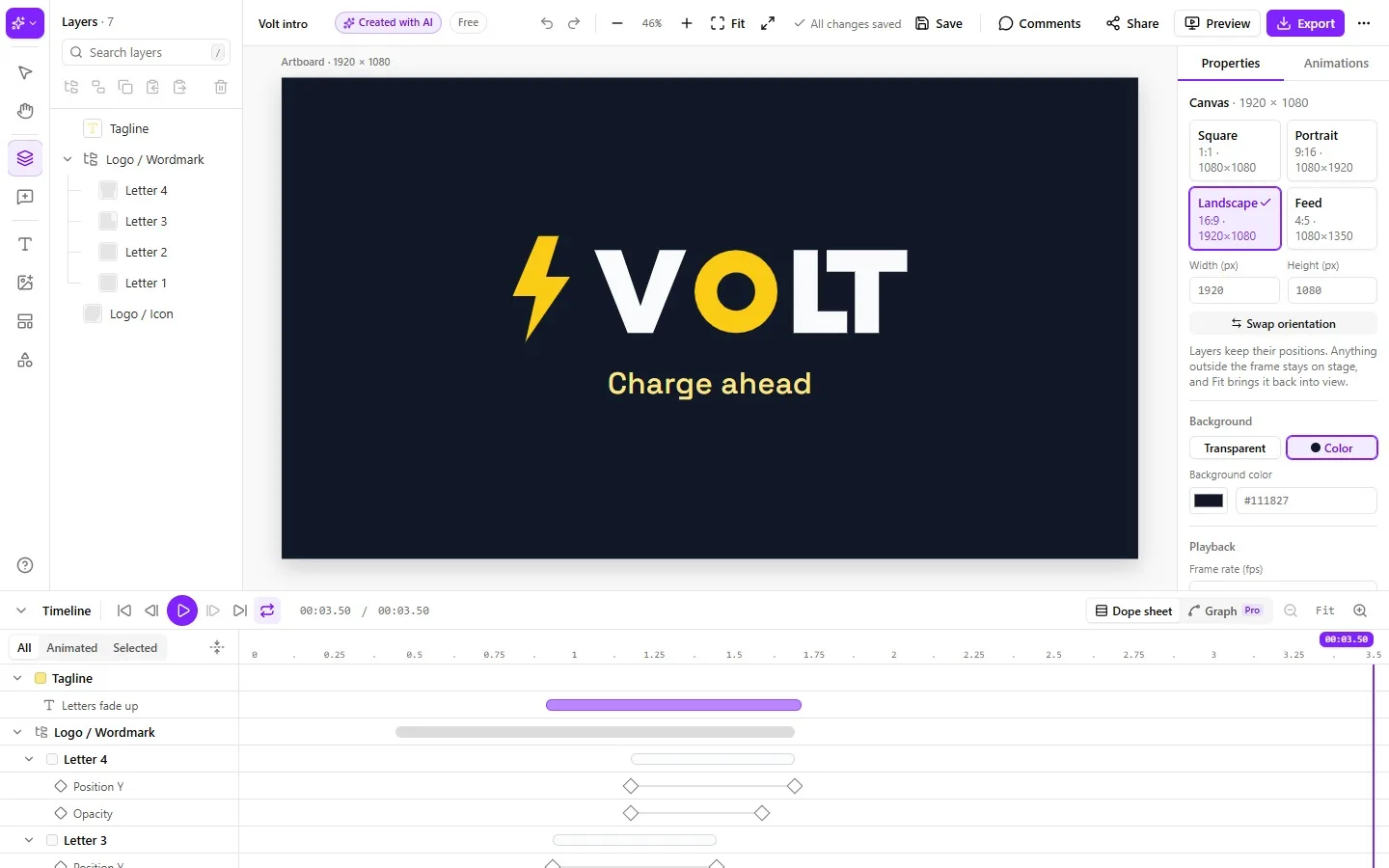
Prompt builder
Start from a ready-made prompt
Copy one, paste it into your AI app and attach your logo. Or build your own in a few clicks.
Minimal
Clean fade with a quiet settle. Works for any logo.
Northwind: Minimal · Fade in · 3 seconds
Playful
A bouncy drop-in with a friendly tagline.
Bubbly: Playful · Bounce · 3 seconds
Tech
Slide-in on a dark background, with a glitch accent.
Quanta: Tech · Slide reveal · 4 seconds
Luxury
The outline draws itself, then the colour fills in.
Maison Vale: Luxury · Draw on (outline traces, then fills) · 5 seconds
MCP integration
Animate your logo with ChatGPT, Claude or Cursor
Vectroke works with any app that supports remote MCP servers. The full, step-by-step setup for each one is on your Connect your AI page.
Claude
- Settings → Connectors → Add custom connector
- Paste the Vectroke address and click Connect
- Press Allow access in Vectroke
ChatGPT
- Settings → Connectors → turn on Developer mode
- Create a connector with the Vectroke address and OAuth
- Press Allow access in Vectroke
Cursor
- Cursor Settings → MCP → Add new MCP server
- Paste the configuration from your Connect page
- Click Connect, then Allow access
Other MCP clients
- Add a remote (Streamable HTTP) MCP server
- Sign in with OAuth, or use a personal access token
- Ask it to list Vectroke’s presets to check it works
Privacy and control
- Your AI can only reach your own projects, never anyone else's account.
- Access is scoped: it can create and edit animations, not change your password, billing or settings, and never delete, publish or share.
- Disconnect an app or revoke a token at any time in Settings, and see what your AI did in your recent activity.
Plans and limits
Connecting your AI is free. Limits reset every month.
| Per month | Free | Pro |
|---|---|---|
| Animations created by AI | 5 | 100 |
| Preview checks | 20 | 300 |
| Animation styles | Fade in, Scale pop, Slide reveal, Letter by letter, Bounce, Rotate in | All |
| Exports | MP4, GIF, 480p, watermark | MP4, GIF, WEBM, Lottie, up to 4K |
Frequently asked questions
What is MCP?
MCP (Model Context Protocol) is an open standard that lets an AI assistant use tools from other apps. Vectroke offers an MCP server, so the AI you already use can create and edit logo animations in your Vectroke account for you.
Which AI apps work with Vectroke?
Claude (claude.ai, Claude Desktop and Claude Code), ChatGPT (with developer mode connectors), Cursor, and any other app that can connect to a remote MCP server. Apps that sign in with OAuth connect with one click; others can use a personal access token.
Do I need a paid AI subscription?
Not from Vectroke. You need an AI app that supports custom MCP connectors; some apps only offer those on certain plans, so check your AI app's plan. Connecting Vectroke itself is free.
Can I edit the animation after the AI creates it?
Yes. The result is a normal Vectroke project made of native layers and keyframes, not a video. Open it in the editor and change any layer, colour, timing or easing. Vectroke saves a version before every AI change, so you can undo it from version history.
Can I upload my own logo (SVG/PNG)?
Yes, give your AI the logo as an SVG file or link: every path becomes its own editable layer, with the icon and wordmark grouped separately. SVG gives the best result; PNG logos are not converted to editable shapes yet.
What export formats are available?
Everything the editor exports. Free: MP4 and GIF up to 480p with a watermark. Pro: MP4, GIF, WEBM and Lottie JSON, up to 4K without a watermark.
Is my data safe?
Your AI can only reach your own projects, through a connection you approve. It cannot see other accounts, change your password or billing, or delete, publish or share projects. You can disconnect an app or revoke a token at any time in Settings.
Is it free?
Yes, to start. On the Free plan your AI can create 5 animations and check 20 previews a month. Pro raises that to 100 animations and 300 previews and unlocks every animation style.
Start animating with your AI
Connect once, then ask for a logo animation whenever you need one. Free to start.